
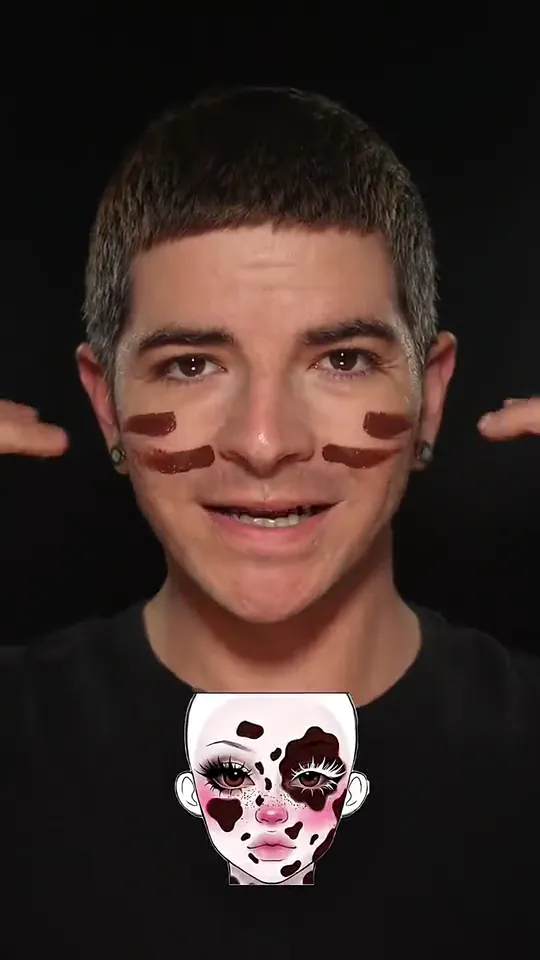
This AI cow makeup generator is for people who want to post the transition to TikTok, Reels or Shorts without face paint or editing. Upload one photo of an adult and get a 15-second vertical MP4 made to follow the SFX reel’s spots, head turn and hard cut, with the trend’s sound. Watching is free; a 480p video costs 601 purchased credits (about $6.01), and paid downloads carry no MusicFlick watermark.
How to make a cow makeup transition from one photo
Upload one clear, front-facing photo of an adult with both eyes, brows and hair visible. Keep the SFX cow look or choose Custom and describe your own cow makeup, then pick 480p, 720p or 1080p. Seedance 2.5 is prompted to follow the SFX reel’s framing, gestures and cut, and MusicFlick adds the reel’s sound to the 15-second MP4.
- Upload one front-facing photo
Choose a sharp JPG, PNG or WebP up to 10 MB, chest up, without sunglasses, hats or beauty filters. Use your own photo or one you have permission to use.
- Pick the cow look and quality
Keep the full SFX cow, or choose Custom to describe another look, such as cute cow makeup with pink cheeks and lashes. You can add a makeup reference photo. Then choose 480p, 720p or 1080p.
- Check the cut and download
Sign in, confirm permission and check the credit quote before generating. When the MP4 is ready, watch the hard cut at about 8 seconds to check your face before you post it.
Watch the cow makeup reel the template follows
This 15-second SFX cow makeup transition is the reference the template follows. The first half shows brown paint smeared on the cheeks and forehead between playful claw hands; at about 8 seconds a head turn cuts to the finished cow with horns, pink-lined ears, a pink nose and a bell, chewing a few leaves. The prompt asks the model to put the person from your photo in both halves; how closely the result matches varies with the photo and the run.
The SFX cow makeup reel
15 seconds, vertical, with sound. The hard cut lands at about 8 seconds.
What is the TikTok cow makeup trend?
The cow makeup trend is a TikTok makeup transition set to Doja Cat’s 2018 song “Mooo!”, a joke track in which she sings that she is a cow. A creator mouths the song with a few brown paint spots on the cheeks, turns the head on the beat, and a hard cut reveals full cow makeup: white face paint with brown patches, a pink nose and often horns, ears and a bell. People also call it the Mooo cow makeup trend or the cow makeup transition.
Most clips are about 15 seconds and vertical. The half before the cut looks like an ordinary makeup tutorial, so the reveal lands as a surprise. Filming it yourself takes face paint, horns and ears on a headband, and a clean cut on the beat; the AI route skips all three.
Cow makeup ideas: SFX cow or cute cow look?
The trend has two common looks. The SFX cow covers the face, neck and shoulders in white paint with brown patches and adds a sculpted pink nose, horns, ears and a bell; this is the generator’s default prompt. The cute cow look is lighter: a white base, one dark patch around an eye, pink cheeks and lips, long lashes and often a cow-print scarf. Choose Custom and describe it to ask for that look in the same transition.
Other cow makeup ideas that work in the Custom box: black-and-white Holstein patches instead of brown, a cow-print bandana, a gold nose ring or a pastel pink cow. Describe only the makeup and costume; the prompt keeps the reel’s moves, black background and cut.
Where did the cow makeup trend start?
The cow makeup trend took off in early November 2026, when Indonesian TikTok creators posted early viral reels with a cute cow look to Doja Cat’s “Mooo!”: a plain face first, then a cow-print scarf and painted patches after the cut. Around 19 November a special-effects makeup artist posted a sculpted full-cow version with horns, ears and a bell; that is the version this template follows.
Doja Cat released “Mooo!” in 2018; the song’s opening line, in which she calls herself a cow, gives the trend its other names.
An early cute cow makeup reel
15 seconds, vertical, with sound. A different look from the SFX reel above; the template does not follow this one.
Cow makeup trend video price and credits
A personalized cow makeup trend video needs purchased credits: 480p costs 601 credits, about $6.01 at the lowest credit rate, for one 15-second vertical clip. With a zero balance, the smallest purchase that covers it is Starter at $9.90 for 900 credits. Watching the reels is free, but there is no free generation, and signup or check-in gifts cannot pay for this template.
| Model | Resolution | Credits | Approx. USD |
|---|---|---|---|
| Seedance 2.5 | 480p | 601 | $6.01 |
| Seedance 2.5 | 720p | 1,351 | $13.51 |
| Seedance 2.5 | 1080p | 4,010 | $40.10 |
| Feature | What you get |
|---|---|
| Watch the reels | Free to watch without an account. |
| Make your cow makeup video | Purchased credits only. Signup and check-in gifts cannot pay for this template. |
| Download and watermark | 15-second 9:16 MP4 with the reel’s sound and no MusicFlick watermark. |
Starter has 900 credits for $9.90, enough for one 480p video. The $4.99 trial pack has 165, below the 480p quote. See credit packs
What the AI cow makeup video can’t do
This template uses one adult photo, one 15-second shot list, one black background and the reel’s sound. Results vary with the model and the photo: likeness, the shape of the patches and the timing of the cut can drift, the face is harder to recognise under full paint, and the mouth follows the reel rather than exact lip sync. It casts one person; it does not make pet, couple or child versions.
Credits return if the video provider fails to deliver a usable clip. If the billed video is ready and MusicFlick’s audio or export step fails, the credits stay spent and support can help finish the clip.
Cow makeup trend FAQ
Can I make the cow makeup video on my phone?
Yes. Open MusicFlick in Safari or Chrome on your phone, pick a photo from your library and save the MP4 when it is ready. There is no app to install.
Do I need an account?
You can watch the reels and check prices without an account. Sign in to generate a video with purchased credits, see the result and download it.
Can I use a friend’s photo?
Only with their permission, and only of an adult. Each video casts one person; the template does not take a second photo for a duo.
Can I post it to TikTok with the Mooo! sound?
The MP4 comes with the reel’s sound so it is ready to post, but MusicFlick grants no rights to the song. Check the platform’s music rules before using it in an ad or a paid post, and keep the AI label on when the platform asks.