
Dip On Em Dance AI is for friends who want to make the airport version without filming themselves. Upload two photos for a 13-second vertical MP4 with the template soundtrack, at 480p, 720p or 1080p. The storyboard is free; a 480p video costs 521 purchased credits (about $5.21), and purchased-credit downloads have no site watermark.
How to make a Dip On Em dance video
Pick who starts and who joins from behind. Dip On Em Dance AI sends a separate photo for each role and asks the model to follow the airport routine. Review the resolution and credit quote before you start, then check the entrance and beat in the result.
- Add both photos
Use photo 1 for the lead and photo 2 for the partner. In the reference, the partner enters from the left rear. Use one adult per photo, JPG, PNG or WebP up to 10 MB.
- Choose what the lead wears
Use the clothes in the lead photo, or choose Custom and describe what the lead should wear. You can add an outfit image. The prompt still asks for the same partner and dance.
- Pick a resolution
Seedance 2.5 makes the fixed 13-second, 9:16 clip. Choose 480p, 720p or 1080p and read the exact quote on the button.
- Check the video and download
Sign in and confirm photo rights to generate. When the result is ready, check who is in front and whether the closing arm pulls land on the beat before downloading the MP4.
Dip On Em airport dance storyboard
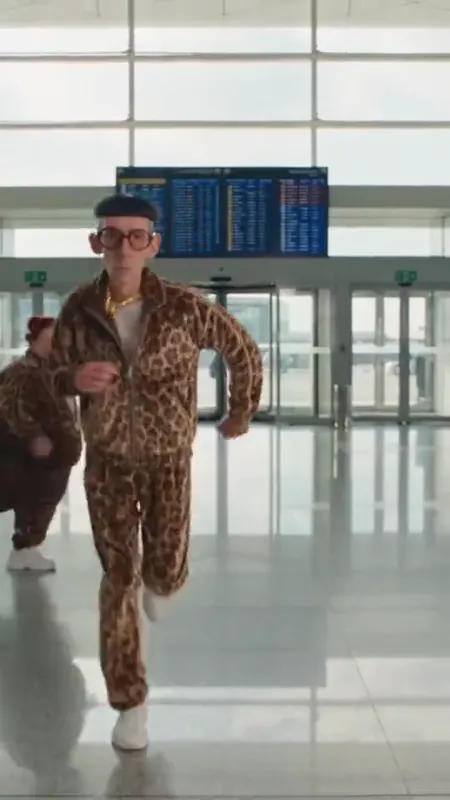
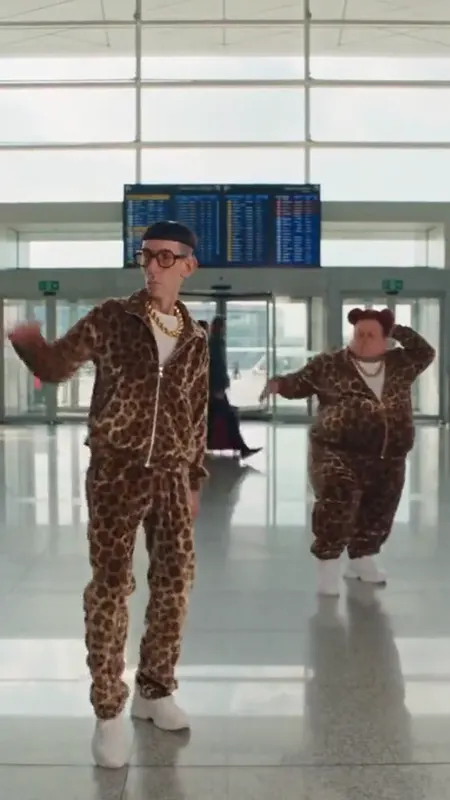
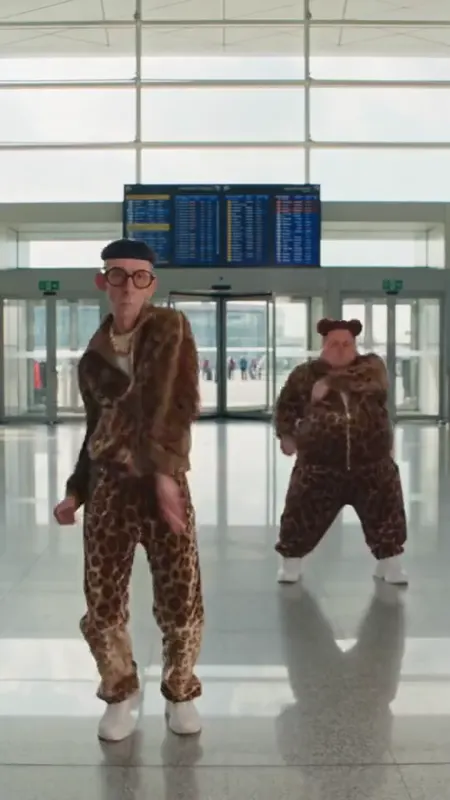
These three stills mark moments in one continuous 13-second template. The foreground dancer opens, the partner appears behind them, and both finish the routine without a change of camera. The stills show how the roles line up with the beat; they are not a preview made from your photos.
Which Dip On Em dance does this make?
Dip On Em Dance AI uses the airport duo as its reference. In that clip, one dancer hops toward the camera before a partner enters from the left rear. The prompt asks the model to match the wide shot, dips, side steps, raised hands and arm pulls; timing and likeness can vary. This is not the solo, snow-cat or four-person template.
The track behind the challenge is “DIP ON EM” by SouthMemphisHypeman. This template uses the sound from the airport cut rather than picking a new song.
How do two photos become a Dip On Em dance AI video?
Dip On Em Dance AI gives the model separate photos for the lead and rear partner. The prompt points to the reference for when the partner enters, how wide the camera is and what steps come next. Those are instructions, not a guarantee that every move matches. The template soundtrack is placed under the result separately.
Use well-lit single-person photos with distinct clothes. If you only have a group photo, make two separate crops, each centered on one adult, before uploading.
Dip On Em dance pricing and credits
A 13-second Dip On Em Dance AI video at 480p costs 521 purchased credits (about $5.21 at the lowest pack rate). The storyboard is free to view, but there is no free personalized run. Higher resolutions cost more; the credit quote is shown before you start, and purchased-credit downloads have no site watermark.
| Model | Resolution | Length | Credits | ≈ USD |
|---|---|---|---|---|
| Seedance 2.5 | 480p | 13 seconds | 521 | $5.21 |
| Seedance 2.5 | 720p | 13 seconds | 1,171 | $11.71 |
| Seedance 2.5 | 1080p | 13 seconds | 3,476 | $34.76 |
| Feature | What is included |
|---|---|
| Storyboard | Free to view. It does not use your photos. |
| Personalized generation | Purchased credits only. Signup and check-in gifts do not pay for this template. |
| Download and watermark | A 13-second MP4 with sound, with no site watermark for purchased-credit output. |
From zero balance, the smallest pack that covers a 480p video is Starter ($9.90 for 900 credits). The $4.99 trial pack has only 165 credits and cannot cover this template. See credit packs
What the airport duo cannot promise
Dip On Em Dance AI asks the model to match the airport routine. Faces, role placement and beat timing can vary with the photos and the result. Start with two clear single-person photos, use clothes that are easy to tell apart, and check both dancers before sharing the clip.
- This template requires two adults and two photos; pets, solo clips and four-person groups are not supported.
- You cannot choose a different scene or camera. Custom only asks the model for a different outfit on the lead.
- The soundtrack is fixed to the template cut, so you cannot switch songs here.
- The only length and frame are 13 seconds and 9:16.
Dip On Em Dance AI FAQ
Does Dip On Em Dance AI work on my phone?
Yes. Open MusicFlick in a current phone browser and upload from your photo library. No app is needed. You can return to the same account to check the video and download it.
Can I use the Dip On Em challenge video in an ad?
The template does not grant a music license. Check the destination platform's rules and secure any rights you need before posting or using the soundtrack commercially.
Where do the two photos go?
The provider reads the uploaded photos at unlisted URLs to generate the video. Anyone with such a URL can open it. Your video is listed in your own account.
Do I need to sign in?
Yes, to generate and download your own video. You can read the storyboard and prices without an account.
Make the airport duo with a friend
Choose a lead and a partner, then get a quote for the full 13-second clip.
Back to the generator