
The Box AI Video is for anyone who wants to appear in the Roddy Ricch meme with a single photo and no manual editing. Preview the short cut for free, then use 581 purchased credits (about $5.81) or more for a 14-second landscape MP4 in 480p, 720p, or 1080p. Paid downloads carry no MusicFlick watermark.
How to make The Box AI Video
Start with one clear photo of the adult you want in both scenes. The Box AI Video generator uses that face and appearance as the performer reference, then asks the model to follow the parking-lot and podium cut. Choose a resolution, check the credit quote, and download the MP4 once it’s ready.
- Choose a clear photo
Upload a JPG, PNG, or WebP up to 10 MB. Keep the face well lit and leave room to see the outfit.
- Set the outfit and quality
Use the outfit in the photo or describe a custom one. Select 480p, 720p, or 1080p and check the displayed cost.
- Generate and download
Sign in to start the video. When it finishes, check the face in the wide shot and at the podium before sharing the MP4.
The Box AI Video example
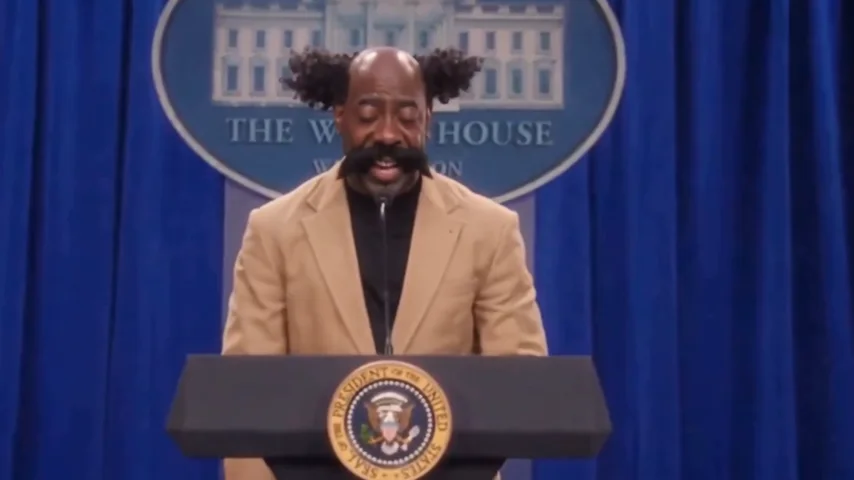
This sample shows the performer dancing in the night parking lot, walking toward the camera after the car flips, and rapping behind the podium. The sample is silent because its soundtrack contains explicit lyrics. The generator adds the reference soundtrack after rendering, and the prompt asks for a plain podium.
A suit at the blue-curtain podium
14.4 seconds. The soundtrack contains explicit lyrics and is muted in this sample.
Which The Box AI video has the car crash?
MusicFlick’s 14-second The Box AI video follows the edit that opens in a night parking lot. The performer dances, a car flips and catches fire behind them, and the scene cuts to a blue-curtain podium for the “2020 president candidate” line. The roughly 20-second edit includes a cash-counting room before the parking lot.
Do I need a The Box AI video app?
You can make The Box AI Video in a phone or desktop browser. Open the generator, upload your photo, and sign in when you’re ready to start. Review the landscape MP4 before posting. For a vertical feed, use your editor’s crop controls and check that the car and the performer still fit.
The Box AI Video pricing and credits
The Box AI Video generator is free to preview. A personalized 14-second video starts at 581 purchased credits in 480p, worth about $5.81 at the lowest per-credit rate. The smallest purchase that covers 480p is the $9.90 Starter pack with 900 credits. Higher resolutions use more credits.
| Model | Resolution | Credits | Credit value | Smallest pack that covers it |
|---|---|---|---|---|
| Seedance 2.5 | 480p | 581 | $5.81 | Starter · $9.90 |
| Seedance 2.5 | 720p | 1,306 | $13.06 | Plus · $24.90 |
| Seedance 2.5 | 1080p | 3,877 | $38.77 | Pro · $49.90 |
| Action | What’s included |
|---|---|
| Watch examples | Free to view in the browser. |
| Generate a video | Purchased credits required. Signup and check-in credits cannot pay for this model. |
| Download the MP4 | Included with generation. No extra download fee or MusicFlick watermark. |
The 165-credit Trial pack does not cover a video on this page. See credit packs
What this template can handle
The Box AI Video template supports one adult performer and the 14-second landscape cut. Faces can look soft in the wide parking-lot shot. The reference performer’s features may carry over, and mouth timing can vary. A well-lit photo with the face unobstructed helps you assess the likeness in both shots.
Credits are returned when the video provider fails. If the video is already generated and only final export fails, contact support to finish the export.
The Box AI Video FAQ
Which photo can I use?
Use an adult photo of yourself or of someone who has agreed to have their likeness used in the clip. Follow the upload and consent requirements before generating.
Can I change the outfit at the podium?
Yes. The default asks the model to use the outfit in your photo. Choose Custom to describe a different outfit for the performer across the edit, and optionally upload an outfit example.
What is the song in the podium edit?
The podium line comes from Roddy Ricch’s “The Box.” Check music rights before publishing the clip, especially for an ad or other commercial post.
Can I close the page while it generates?
Yes. Come back to The Box AI Video in the same signed-in account and open your recent videos to check the status or download the completed result.